Northside’s mission is to make disciples of Jesus Christ, educated and equipped for any future.
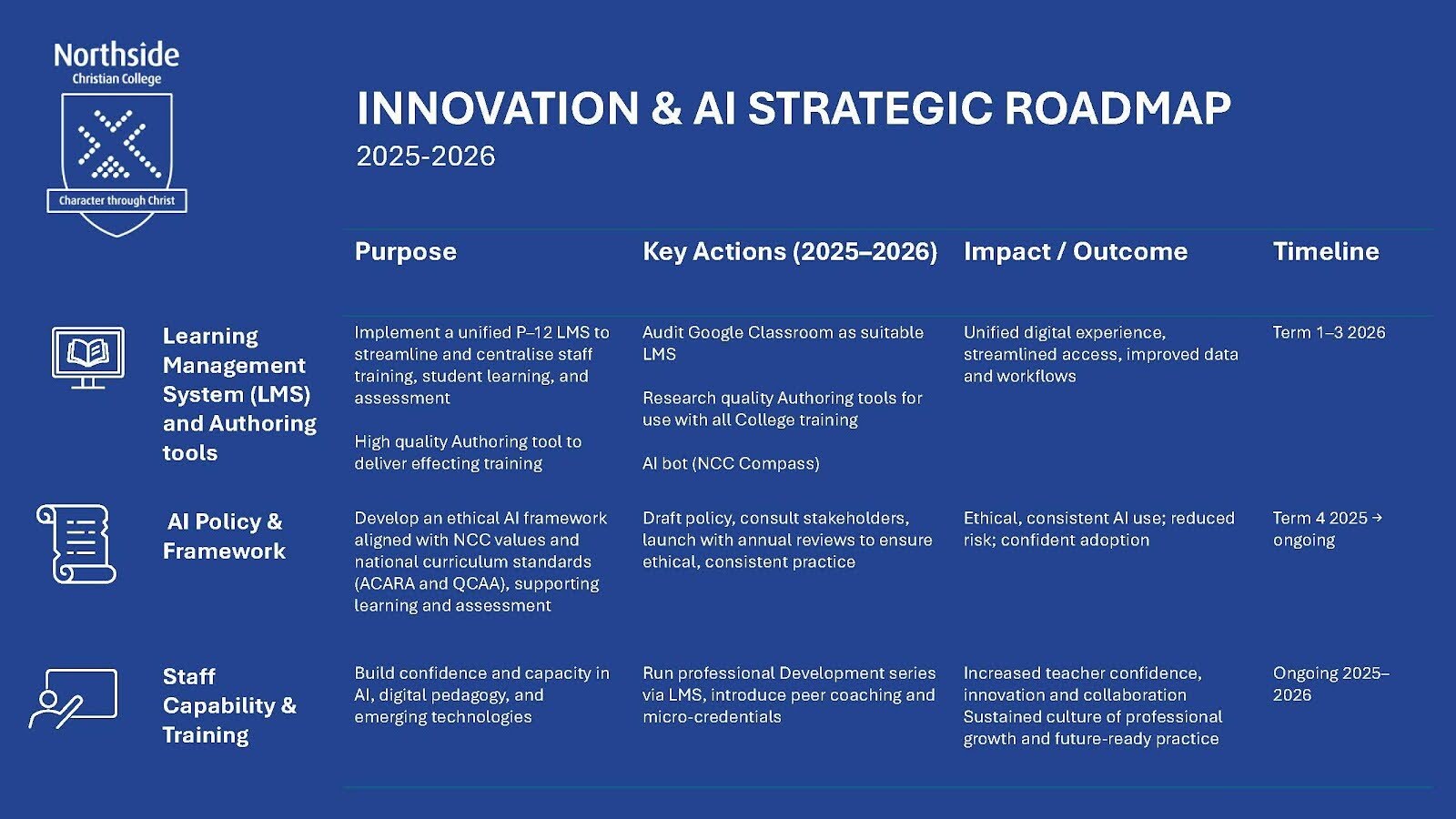
Futures Learning is our commitment to preparing students for a changing world through forward-thinking, adaptable, and technology-enhanced education. As part of our College Strategic Plan, we are developing an Innovation and AI Roadmap, taking a thoughtful and staged approach to the use of AI and emerging technologies. Our focus is on building staff capability, enriching student learning, and embracing innovation while prioritising safety, privacy and academic integrity.
Why do we need an AI Roadmap?
AI is becoming part of everyday life and work. At Northside Christian College we’re helping students become confident, discerning and ethical users of technology, so they can learn well, think critically and act with integrity. Through an extensive research and beta-testing program, we have had the opportunity to test a number of AI tools to ascertain which platform best suits the College's needs.
What AI do we use at Northside?
Students at Northside use TrekAI as our approved AI platform in a guided, age-appropriate way. There is careful consideration and planning for when TrekAI is used, based on the appropriate year level and each specific subject.
It helps students to:
Get explanations, examples and step-by-step hints
Practise skills and receive feedback
Learn how to ask better questions and check information
AI supports learning, it doesn’t replace teachers. Teachers remain responsible for teaching, assessment and guiding students to use AI wisely. Like any other learning resource, it’s at the discretion of the teacher and curriculum leader to determine when AI is best used to support student learning.
How do we use AI in classrooms?
Depending on year level and subject, students may use TrekAI to:
Rephrase instructions into student-friendly language
View worked examples (e.g., Maths, Science, Humanities)
Practice vocabulary, spelling and comprehension
Plan writing (brainstorming, structure, sentence starters)
Receive feedback prompts (e.g., strengthening evidence or conclusions)
Students are also taught AI’s limits: it can be wrong, incomplete or biased, so they must verify and think critically.
How do we maintain academic integrity?
Our approach aligns with the Queensland Curriculum and Assessment Authority (QCAA) guidance on academic integrity and generative AI, including:
Clear expectations about when AI can and cannot be used
Teaching students to produce authentic work
Building skills like drafting, process work and referencing
Using checkpoints and other authentication strategies
Using AI detection tools cautiously (they can be inconsistent)
How do we balance AI with safety, privacy and wellbeing?
Our approach aligns with the Australian Framework for Generative AI in Schools, emphasising safe, ethical and responsible use. In practice, we teach students to:
Never enter personal or sensitive information into AI tools
Use AI to support learning, not to shortcut assessable work
Double-check AI outputs for accuracy and appropriateness
We regularly review our practices as the technology evolves.
How are staff trained in AI?
To ensure AI is used well and safely across the College, we provide ongoing professional learning for staff. Professional development includes:
Training on how TrekAI works and how to use it effectively in lessons
Guidance on safe, ethical and age-appropriate classroom practice
Support with assessment design and academic integrity (including student authentication strategies)
Coaching and planning support for teams, year levels and individual teachers
Regular updates as guidance and technology continue to evolve
Our goal is consistent, high-quality practice across P–12, so AI strengthens learning while keeping student wellbeing, privacy and integrity at the centre.
What can families do at home?
Encourage AI as a learning partner, not an “answer machine.” Helpful prompts include:
“Show me what you tried before using AI.”
“What parts still need checking?”
“Explain it in your own words.”
“What will your teacher expect you to do independently?”
Remind students: don’t share personal information, don’t submit AI work as their own, and keep drafts/notes that show their thinking.
Who manages AI and Futures Learning at Northside?
Marsha Spiker has been appointed as our Futures Learning Coordinator across P-12, as our dedicated expert in the integration of emerging technologies across the College. She will provide training and support for staff as well as fresh opportunities for students to enhance their learning, creativity, and problem-solving as we navigate this dynamic environment. Marsha will work alongside our IT Department and our school leaders to help develop digital skills and critical thinking, and to provide STEM and technology extension programs throughout the school term.
Thank you for partnering with us as we guide students to use AI and technology with wisdom and integrity. Guided by our motto Character through Christ, we are committed to nurturing honesty, resilience and respect alongside academic excellence—so every student is educated and equipped for any future..